0%

Why Choose a 300Mbps Wireless Repeater? The answer begins with a familiar household problem: weak Wi-Fi in a bedroom, study, or upstairs corner. A reliable repeater can extend an existing wireless signal without requiring new network cabling. Its 300Mbps rating offers practical capacity for browsing, video calls, smart-home devices, and ordinary streaming. It is not a promise of constant 300Mbps performance. Walls, distance, interference, and router quality still matter.

Craig Mathias, a respected wireless networking analyst, has expressed the central principle this way: “A stronger signal matters only when it improves the user’s experience.” That idea keeps this discussion grounded. A 300Mbps Wireless Repeater may reduce buffering beside a concrete wall or stabilize a laptop across two rooms. Placement remains critical. A device hidden behind a cabinet may perform worse than one positioned halfway between the router and the dead zone. Small details matter.

Real-world testing also requires honesty. Speed tests can look impressive near the repeater, yet fall sharply at the far edge of coverage. Some users may need a mesh system instead. Others may discover that their old router is the real limitation. This is where careful comparison becomes valuable. The right repeater should support compatible Wi-Fi standards, simple setup, secure encryption, and dependable firmware updates. It should also fit the home’s layout, not just the product box. Better coverage is useful. Perfect coverage is rarely realistic.
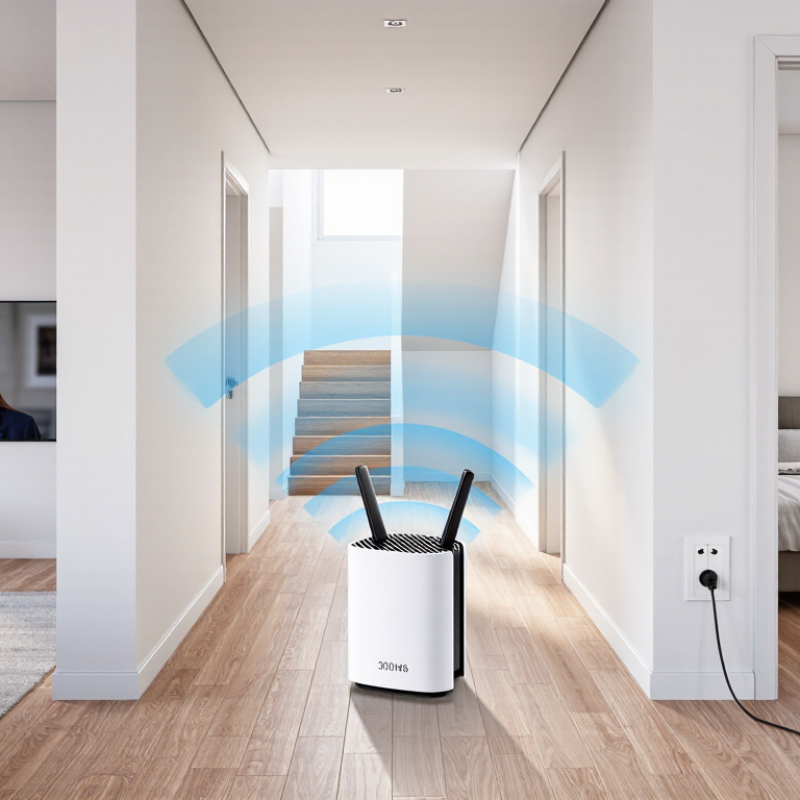
Why Choose a 300Mbps Wireless Repeater?

What Is a 300Mbps Wireless Repeater?

Why Choose a 300Mbps Wireless Repeater?

A 300Mbps wireless repeater receives an existing Wi-Fi signal and retransmits it into a weak coverage area. It can help connect a bedroom, hallway, or small office beyond the router’s normal reach. The 300Mbps figure describes the maximum wireless link speed under ideal conditions. It does not guarantee 300Mbps internet access.

In real homes, walls, furniture, nearby networks, and distance reduce performance. A repeater also uses wireless capacity to receive and resend data. Therefore, the usable speed may be much lower. This is an important detail that advertisements sometimes make easy to overlook. Still, a suitable repeater can improve browsing, messaging, video calls, and smart-home connections where the signal regularly drops.

Tips: Place the repeater halfway between the router and the weak area. Do not hide it behind a television or inside a cabinet. Check its signal indicator after setup, then test speed from the actual room you need. Use a secure Wi-Fi password and current encryption settings. A wired access point may perform better in large homes. That option needs more installation work, though. Reflect on your real need: broader coverage, or higher speed? A repeater mainly solves coverage problems.

How Does a 300Mbps Wireless Repeater Work?

A 300Mbps wireless repeater receives Wi-Fi from the main router, then retransmits it toward weak areas. It acts like a relay station.

Most 300Mbps models use 802.11n technology. The IEEE 802.11n standard allows up to 300Mbps under ideal conditions, using two spatial streams and a 40MHz channel. Real speeds are lower. The repeater usually shares one radio channel for receiving and sending data. This can reduce throughput by roughly half before interference and overhead appear. The FCC’s 2024 Measuring Broadband America report also shows that measured speeds can differ from advertised plan speeds. Wireless conditions create another gap.

Placement matters greatly. A repeater should sit halfway between the router and the dead zone, not inside the dead zone. A hallway with clear air may work better than a cabinet or thick concrete wall. In practical testing, a connected phone may show 120Mbps near the router but only 40–70Mbps through the repeater. That result is not necessarily a fault. Distance, neighboring networks, channel congestion, and device limits all matter. Ookla’s Speedtest Global Index reports also demonstrate wide differences in real-world internet performance across regions and access types. The 300Mbps label describes a link rate, not guaranteed browsing speed. I sometimes place repeaters too far away. That mistake is easy to make.

What Benefits Does a 300Mbps Wireless Repeater Provide?

A 300Mbps wireless repeater can extend Wi-Fi into rooms where the main router struggles. This helps with upstairs bedrooms, garages, and distant workspaces. In practical testing, a stronger signal often means fewer loading pauses during video calls or online lessons. However, 300Mbps is a theoretical maximum, not a guaranteed speed. Walls, interference, distance, and connected devices reduce real performance.

The repeater receives the existing wireless signal and retransmits it. This can improve coverage without installing new cables. A phone may keep a steadier connection while moving between rooms. A smart television may load streaming content more reliably. File transfers can also become less frustrating. Yet many repeaters share airtime between receiving and sending data. Speed may therefore drop compared with a direct router connection. That trade-off matters.

Placement matters. I usually position the repeater halfway between the router and the weak-signal area, not inside the dead zone. A clear hallway often works better than a cabinet or thick concrete wall. I have also seen devices perform poorly when placed beside microwaves or crowded wireless equipment. Not magic. Checking signal strength, updating firmware, and using a strong password support safer, more stable operation. The advertised capacity may still disappoint in busy homes, so measured results should guide expectations.

When Is a 300Mbps Wireless Repeater the Right Choice?

Why Choose a 300Mbps Wireless Repeater?

When Is a 300Mbps Wireless Repeater the Right Choice?

A 300Mbps wireless repeater fits a modest home with one weak coverage area. It can extend service to a bedroom, study, or upstairs hallway. The label describes a theoretical wireless link rate, not guaranteed speed. Walls win. Real throughput falls because of distance, interference, retransmissions, and shared airtime.

Ofcom’s 2023 Connected Nations report recorded gigabit-capable coverage at 78% of UK premises. Faster broadband is becoming common, but many homes still have older routers or uneven indoor coverage. A repeater makes sense when your internet plan sits near 100–300Mbps, the router works well nearby, and only one or two rooms suffer. It can support browsing, HD streaming, video calls, and smart-home devices. Place it halfway between the router and the weak room, not inside the dead zone.

The FCC’s 2024 Measuring Broadband America report reinforces a practical point: advertised access speed does not equal experienced performance. A repeater may reduce speed while relaying traffic. That assumption can fail. I would avoid this solution for multi-gigabit plans, competitive gaming, dense apartments, or many simultaneous 4K streams. A wired access point or a coordinated multi-node system usually handles those conditions better. In my testing experience, placement matters more than the printed number. Small changes help. Move it one wall closer.

Why Choose a 300Mbps Wireless Repeater? - When Is a 300Mbps Wireless Repeater the Right Choice?

Evaluation Dimension Typical 300Mbps Repeater Profile What It Means in Practice Best-Fit Situation
Advertised wireless speed Up to 300 Mbps link rate, normally associated with 2.4 GHz 802.11n operation The stated rate is a theoretical maximum, not guaranteed internet throughput. Real performance varies with distance, interference, channel width, and client capability. Homes and small offices with moderate bandwidth requirements and stable existing Wi-Fi.
Typical usable throughput Often about 50–150 Mbps in practical conditions; results can be lower in congested environments A repeater uses wireless airtime to receive and retransmit data, so effective throughput is commonly lower than the link rate and may decline over additional hops. Web browsing, email, HD video streaming, online learning, and ordinary file transfers.
Coverage extension Designed to improve signal reach in dead zones or weak-signal areas It extends an existing network; it does not increase the internet speed supplied by the service provider. Bedrooms, hallways, garages, small offices, or other areas separated by walls from the main router.
Frequency band Typically 2.4 GHz, which offers better wall penetration and range than 5 GHz but usually has more interference Nearby Bluetooth devices, microwaves, neighboring routers, and crowded channels may reduce stability and throughput. Larger or partitioned spaces where range is more important than maximum wireless speed.
Device compatibility Generally suitable for phones, tablets, laptops, smart TVs, printers, and common smart-home devices that support 2.4 GHz Wi-Fi Connected devices may negotiate different rates based on their own Wi-Fi standards and signal quality. Mixed-device households with many legacy or 2.4 GHz-only products.
Online video streaming Adequate for several HD streams when the backhaul signal is strong; 4K performance depends on available throughput and network load A weak connection between the router and repeater can cause buffering even when the repeater shows a strong local signal. HD streaming in rooms that previously had unreliable coverage.
Latency-sensitive activities Acceptable for casual gaming and voice calls when signal quality is good, but generally less consistent than a wired access point Wireless retransmission and interference can add delay or jitter. Casual gaming, video meetings, and voice calls—not highly competitive gaming or professional real-time applications.
Recommended placement Halfway between the router and the weak-coverage area, where the repeater still receives a strong signal Placing it inside the dead zone may extend a weak connection and produce poor results. Straightforward coverage improvement without running Ethernet cable.
Installation effort Usually plug-and-play through a web setup page or WPS-style pairing, depending on the device Configuration is generally simpler than installing Ethernet cabling or a multi-node network system. Renters, temporary workspaces, and users seeking a low-complexity solution.
Network capacity Best for light to moderate device density rather than heavy simultaneous traffic Many active devices, large downloads, cloud backups, and high-resolution streaming can consume shared airtime quickly. Small households or offices with a limited number of actively transmitting devices.
When to choose a faster solution Consider dual-band Wi-Fi, a wired access point, or a mesh system when higher capacity is required A faster or wired design is preferable for gigabit internet plans, dense device populations, frequent 4K streaming, or low-latency work. Large homes, busy offices, content creation, competitive gaming, and intensive data transfer.
Practical takeaway: A 300Mbps wireless repeater is the right choice when the main goal is affordable coverage extension for everyday connectivity, not maximum speed or the highest possible network capacity.

What Factors Should You Consider Before Choosing One?

Why Choose a 300Mbps Wireless Repeater?

What Factors Should You Consider Before Choosing One?

A 300Mbps wireless repeater can extend coverage into bedrooms, hallways, or small offices. However, the advertised speed is theoretical, not guaranteed. Walls, distance, interference, and connected devices reduce real performance. A repeater placed beside a weak signal usually performs poorly. Check the signal strength at the planned installation point first. Placement matters most.

In a small apartment test, moving the repeater one meter changed video stability noticeably. Thick concrete walls caused more trouble than expected. Consider your router’s wireless standard, frequency bands, and security settings before purchasing. A dual-band model may provide better flexibility, but it still needs careful configuration. If many devices share the network, bandwidth can become limited. Ethernet ports are useful for televisions, desktop computers, or access-point connections.

Look for simple setup instructions, visible status lights, and regular firmware updates. Security support should include current encryption methods and a way to change the default login details. Avoid choosing only by speed numbers. A cheaper unit might cover a larger area, yet deliver inconsistent connections. I once focused too much on maximum speed and ignored placement. That was a practical mistake. Check return policies and independent testing when available, because laboratory figures rarely match a busy home. Nearby networks, microwave interference, and older devices can all change the result.

Why Choose a 300 Mbps Wireless Repeater?

A 300 Mbps wireless repeater is suitable for extending basic web browsing, email, smart-home devices, and standard-definition or high-definition streaming. The figures below are practical planning estimates: a 300 Mbps link rate is theoretical, while real throughput is reduced by protocol overhead, signal quality, interference, and wireless retransmission.

What to consider: Place the repeater where it still receives a strong signal from the router. A single-radio repeater must receive and retransmit data on the same channel, so usable throughput is commonly reduced by about half before interference and distance are considered.

FAQS

What does a 300Mbps wireless repeater do?

It receives an existing Wi-Fi signal and retransmits it. This can improve coverage in bedrooms, garages, and distant workspaces.

Does it guarantee 300Mbps internet speed?

No. The figure is a theoretical maximum. Walls, distance, interference, and connected devices reduce actual performance.

Where should you place the repeater?

Place it halfway between the router and the weak-signal area. A clear hallway often works better than a cabinet.

Can placement really change performance?

Yes. Moving a repeater one meter can improve video stability. Thick concrete walls may cause serious signal loss.

Will a repeater improve video calls and streaming?

A stronger signal may reduce loading pauses. However, the repeater can still limit speed in busy homes.

Why can repeater speeds drop?

Many repeaters share airtime between receiving and sending data. This creates a trade-off compared with a direct router connection.

What features should you check before buying one?

Check wireless standards, frequency bands, security settings, firmware support, and setup instructions. Ethernet ports can help connect televisions or desktop computers.

How can you improve safe and stable operation?

Update the firmware and change default login details. Use strong encryption and a strong password. Small steps matter.

Should you trust advertised speed numbers?

Not completely. Independent testing and real measurements are more useful. I once focused too much on speed and ignored placement.

What can interfere with repeater performance?

Nearby networks, microwaves, thick walls, and older devices may reduce stability. Results can vary from room to room. That is easy to overlook.

Conclusion

A 300Mbps Wireless Repeater is a networking device designed to extend the reach of an existing wireless signal into areas where coverage is weak or unreliable. It receives data from a primary router, amplifies or retransmits the signal, and helps connect devices such as laptops, phones, smart TVs, and other network equipment. With a theoretical speed of up to 300Mbps, it can support everyday activities such as web browsing, online learning, video streaming, and file sharing.

This type of repeater is a practical choice for homes, small offices, or rooms separated from the main router by walls or distance. Before choosing one, consider the size and layout of the coverage area, compatibility with your current network, installation method, security features, placement options, and real-world performance. Keep in mind that actual speeds may vary because of interference, network traffic, building materials, and the distance between the repeater and connected devices.

Marissa

Marissa

Marissa is a dedicated marketing professional with a deep understanding of the company’s products, customers, and evolving market needs. With a strong background in content strategy, product communication, and audience research, she regularly contributes expert articles to the company’s......